Monday, December 5, 2016

Writing Custom Python Code in ODI

Namaskaram Friends!

Here is a short post on how to write custom python code inside ODI.
What does this mean?

If you look at the concept of Procedures in ODI, you will find that the procedures can be written for a number of technologies, using the technology drop down.
This flexibility makes it a beautiful product, where you can write your procedure in any given technology if the integration project involves a lot of different technologies.

Python is a well known language these days, which is used in a number of industries because of its rich set of libraries.

In this post let's try to explore how to write Python code in ODI ( I am using ODI 11g version here).

Let's work on a very simple scenario:
Lets say we are working on a Data integration project where the client gives us a location to pick the file, and process it using Interfaces (file to table).

The step is,before we process the interface we need to check whether the file exist in the given location/path or not.

To accomplish this task we will write simple python code.

Create a Procedure name it CheckFile, select the Technology as Jython.
              Don't get confused, Jython is Python language implementation that is tightly integrated with the Java Platform. So all the python code is still applicable here

Here is the python code: (take care of the indentation, because python works on the concept of indentation to define its scope, else the code will throw error)

import os
from os import path

def main():
    file_path="D:\\empdata.txt"  
    #The above file_path can also be an odi variable which queries the location from some                     configuration table, that makes the solution even more configurable.
    my_file = os.path.exists(file_path)
    if my_file:
        print("path does  exist")
        return 0
    else:
        raise
#You can write your custom python code here to do mitigations in the else section.
if __name__=="__main__":
    main()


The procedure checks whether the file exists in the mentioned path or not.

Create a package like this:

When you execute the package, it will first check if the file exist or not, if the file does not exist it will perform the things that you would have mentioned in the else part of your python code.

Hope this would have been useful!!!

Peace

Tuesday, November 29, 2016

ODI Standalone Agents what are they and how to configure

The ODI environment comes with a concept of Agent.

If you have to give a one liner crisp definition about what an ODI Agent is, we will say that it is:
An ODI runtime process that orchestrates ETL flow.

In other words, an ODI agent is a java process, that facilitates the execution of code developed in ODI.

ODI 11g has 2 types of agent: Standalone agent and J2EE agent.
JEE enable ODI agent that allows the ODI agent to inherently take advantage of the application server's enterprise features, such as high availability, connection pooling and so on. However a standalone agent does not give all this features but it does not require a Application server to host it.

In this article, lets try to explore how standalone agents can be configured and used in ODI.

Navigate to the <oracle installed location>\oracledi\agent\bin

The directories may changes from installation to installation , based on where have you installed them.

You will see 2 files there: odiparams.bat and odiparams.sh. The installation folder contains both the files, based on the platform we need to choose which file needs to be edited.

So for a typical windows installation, open the odiparams.bat file. Modify the below parameters.

set ODI_MASTER_DRIVER=oracle.jdbc.OracleDriver
set ODI_MASTER_URL=jdbc:oracle:thin:@localhost:1521:ORCL
set ODI_MASTER_USER=<name of the master repository schema>

set ODI_MASTER_ENCODED_PASS=aYyp5IHh5AGwjgDJw2DgCy

How to generate the encoded password?

In the same folder, type the following command in cmd:

>> encode <master_repo_schema_password>
one encoded string appears.

copy the above encoded string and change the parameter value accordingly.

Similarly change the following parameters:

set ODI_SUPERVISOR=SUPERVISOR

set ODI_SUPERVISOR_ENCODED_PASS=h2yXu8fMrWKoE90kGUN5Extg (generate this string using the encode utility)

One more parameter:
set ODI_SECU_WORK_REP=WORKREP1 (this would be the name of the workrepo associated with the master repo)

Login to ODI studio and Navigate to Topology:

Under Agents: Right Click and select New Agent:
Enter the information:


once the information is entered in the page: navigate to agent/bin folder.
Execute the following command:

>>agent/bin>agent -NAME=<name of the Agent> -PORT=<port no> (The value for the parameters is as per the values given while creating the agent in ODI studio).

The cmd window will display this, once the agent is started:


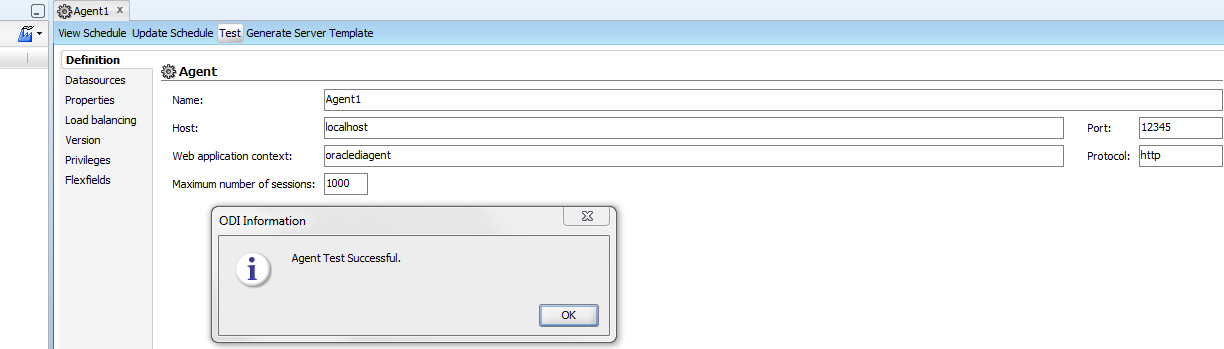
Go to the agent page in ODI studio and click on the test button, since the agent is running, it will show agent successfully connected message:


That's it, the standalone ODI agent is configured.
Please leave comments if there are any doubts regarding any concepts.

Friday, November 25, 2016

Resetting USER passwords in ODI 11g

Lets try to explore one small thing.

Suppose you installed ODI into your system, now after the installation is done, the user is created.
But due to some other works, you did not login to the ODI studio, or some one messed up with the password etc and some how now, you are not able to access the studio because the password does not work.

The obvious solution for this is to reset the password for the user and start using.

Let's see how this is done.

As you would know, all the users created will go to the tables in master_repository.

Login to master_repository in the database where the repository is hosted.

Execute the following Query:

Select * from SNP_USER where WUSER_NAME= <name of your user>;
You will see one column with the name PASS, now to reset the password we will have to update this column with the new encoded password.

To get the encoded password, we will make use of the encode utility shipped with ODI.

based on the platform/OS where ODI is installed, navigate to the following folder

<ODI installed location>\Oracle_ODI1\oracledi\agent\bin

open cmd/ terminal and change to this directory.

>> cd <ODI installed location>\Oracle_ODI1\oracledi\agent\bin
>> encode <newpassword> (give just the password, arrows are only to show things clearly)

One encoded string will be generated.

Execute the following Query in master repository:

update snp_user
set PASS='aYya6Tx0FiJV,hpw94CKPy' (the above encoded string)
where WUSER_NAME= <name of your user>;

commit the changes.

You are done, navigate to ODI studio and use the new password (the normal string , not the encoded one).

Thanks for reading, see you in another post.

Saturday, October 24, 2015

Sunopsis Memory Engine in ODI

Hello Friends!!

So here is the requirement, using ODI we need to create interfaces for transferring data from file ( in one location) to file ( to another location).

You might be thinking we can directly put the files from one location to another using any of the secure copy command from Unix, but think it this way: The files come to the desired location as everyday job, our scheduled ODI jobs will pick the files and put them to another location ( how easy is that).

Now the constraint is, I am not provided with any of the RDBMS from the client to run my mappings in between and if I have to run ODI I need at least one RDBMS area for processing.

What to do now?

In a situation like this, “Sunopsis Memory Engine” Can help us

Actually Sunopsis Memory Engine is an In memory pure java based RDBMS. (hsql).

So our problem is solved now, we can utilise this as the RDBMS area for processing, so now when you create the interface where the source and target data store are both of File type, check the checkbox “Staging area different from target” and select the Sunopsis Memory Engine.


In the flow tab select the KMS:
LKM: File to SQL
IKM: SQL to File Append.


Save the interface and Execute it…….
Bingo!!! the file is generated at the other server.

Tuesday, April 14, 2015

PL/SQL- Package Data Session persistence, how to use it, using PRAGMA SERIALLY_REUSABLE

In this post I will try to show the session's persistence of Package  Data, what are the issues with the Default behaviour and what can be done to alter this behaviour.

Session: When ever a Client connects from a machine to a Database server, a session is set up between the server and the Client, now this session is responsible for any communication between the server and the client.
If the same user logs in  from different client/machine then a separate session will be created.

In Oracle the data for a particular session resides in the PGA.

What is meant by Package Data persistence for a Session?
 The Default behaviour for a Package Data is once the variables in the Packages are assigned then they will hold their values until the session end or Disconnects.

Lets look at examples to understand the issue better.


Note: All code mentioned here can be executed in the HR schema provided with Oracle installation 11g.

Create a new session using Sql/Developer

CREATE OR REPLACE PACKAGE DEMO1
AS
employee_name VARCHAR2(256);
PROCEDURE EMPLOYEE_SALARY(e_name IN VARCHAR2);
END DEMO1;

CREATE OR REPLACE PACKAGE BODY DEMO1
AS
PROCEDURE EMPLOYEE_SALARY(e_name IN VARCHAR2)
AS
BEGIN
SELECT last_name into employee_name FROM EMPLOYEES WHERE first_name=e_name;
END;
END;

This is a simple package which is going to give the last name of the employee when the first name of the employee is used a Parameter in the EMPLOYEE_SALARY procedure.

Execute the below block now:

SET SERVEROUTPUT ON ;
BEGIN
DEMO1.EMPLOYEE_SALARY('Neena');
dbms_output.put_line('The name of the employee is '||DEMO1.employee_name);
END;

output of the block is :
anonymous block completed
The name of the employee is Kochhar

Now the DEMO1.employee_name variable is assigned this value and until this value is over written with another call with a different parameter value, the value will persist for the session.

So if you only execute the below block:

SET SERVEROUTPUT ON ;
BEGIN
dbms_output.put_line('The name of the employee is '||DEMO1.employee_name);
END;

Still the output will be :
anonymous block completed
The name of the employee is Kochhar

Now execute the below block from a different session, so for this open the SQL PLUS :

You will see that for this session, employee_name variable is not yet assigned any value as this is a new session.

This data persistence at session level is useful, but it can easily cause memory issues as the session variables will remain in the PGA for the whole session and eat up the memory area and will decrease the performance.

In order to overcome this behaviour we can make Oracle Package data to persist only for a specific call within the session using a PRAGMA SERIALLY_REUSABLE.

Lets look at one example for this :

CREATE OR REPLACE PACKAGE DEMO2
AS
PRAGMA SERIALLY_REUSABLE;
employee_name VARCHAR2(256);
PROCEDURE EMPLOYEE_SALARY(e_name IN VARCHAR2);
END DEMO2;

CREATE OR REPLACE PACKAGE BODY DEMO2
AS
PRAGMA SERIALLY_REUSABLE;
PROCEDURE EMPLOYEE_SALARY(e_name IN VARCHAR2)
AS
BEGIN
SELECT last_name into employee_name FROM EMPLOYEES WHERE first_name=e_name;
END;
END;


SET SERVEROUTPUT ON ;
BEGIN
DEMO2.EMPLOYEE_SALARY('Nancy');
dbms_output.put_line('The name of the employee is '||DEMO2.employee_name);
END;

Output for this is 
anonymous block completed
The name of the employee is Greenberg

Execute the second block:

SET SERVEROUTPUT ON ;
BEGIN
dbms_output.put_line('The name of the employee is '||DEMO2.employee_name);
END;

Output is :
anonymous block completed
The name of the employee is 

As compared to the previous case now the data persist only for a specific call and not for the whole session!!!!!

Hope this helps............

Wednesday, April 8, 2015

ODI- Static Error Control and Data Quality checks using CKM in Oracle Data Integrator

In order to perform Data Quality checks and initial cleaning of the data ODI provides 2 kinds of DQ checks: Static Control and Flow Control.
Static Control->This is used to check the quality of the data that is already present in the Data store, that is why this is known as Static.
Flow Control->This is used to check the quality of the data at the time of Integration process, that is when the data is being processed into the Target table, at that time we can separate out the error records (i.e. the records that do not full fill the constraints set for the Data Quality)

In this post we will see Static control:

Take the SCOTT schema and the EMP table from the schema.

Now add one record to the table:

INSERT INTO SCOTT.EMP
VALUES (1234,'Test','Test',null,sysdate,1000,NULL,10);


Assume that this record came while extract process and this is bad data and now you want to do a static check of your data and want to know quality before initiating the transfers to Target database .

ODI part:
1. Reverse Engg this table to some Model in ODI.

2. Import your technology specific CKM into the Project as shown in the screen shot.


3. In the Emp datastore add one constraint.

4. Start the DQ check process.
5. Once the session is complete Click on Control-Errors, this will display the records that do not satisfy the constraint.

Understanding the process (CKM)
1. The operator window for your session will look something like this.


2. One SNP_CHECK_TAB is created in the work schema of the Default physical schema.
3. E$ tables will be created in the work Schema.
4. The insert CK errors step will display the code like this:
from SCOTT.EMP  EMP
where not (
ENAME<>'Test'
)

this is where the data is getting filtered out into the E$ table.


Wednesday, January 28, 2015

Exception Handling in PL/SQL

Lets take a look at EXCEPTION Handling in PL/SQL:

Exception handling in any general programming language would be:
When we talk about defensive coding style we expect that due to some reasons ( like application data, unexpected data) errors may come in the program, and when errors come we have 2 options:
1. Leave it to the environment to deal with the exception.
2. Handle the error within your program and give user an easily understood message, rather than the environment message which may be tricky and technical for the users to understand.

PL/SQL exception handling:

1. The exceptions will be handled in a block of program named exception, so if your program handles exception then the structure of the program will look something like

DECLARE
BEGIN
EXCEPTION
WHEN <name_of_the_exception> THEN <define_action>
END;

2. Oracle provides 2 functions SQLERRM and SQLCODE
SQLCODE: This function returns the error code that is associated with the error that came in the program.
SQLERRM: This function returns the code along with the error message,here the code will also be appended with ORA

3. There are some list of predefined exceptions given by Oracle where the exceptions can be addressed by the name.

Example: Run the script in HR schema:

SET SERVEROUTPUT ON;
DECLARE
job_name varchar2(256);
BEGIN
SELECT job_id INTO job_name FROM employees;
EXCEPTION WHEN TOO_MANY_ROWS
THEN
DBMS_OUTPUT.PUT_LINE('Inside the exception block with code'||SQLCODE);
DBMS_OUTPUT.PUT_LINE('Inside the exception block with Error message'||SQLERRM);
END;

Few points about the above code:

1. The select statement gave error in the code as job_name was a scalar variable and the code returned multiple values.
2. As soon as the error occurred exception is raised and oracle checked for the exception block, when it find the exception block, it executed the print statements.
3. SQLCODE returned only code and SQLERRM gave error message also.
4. TOO_MANY_ROWS is a predefined exception with error code value : -01422.


USER DEFINED EXCEPTION:

Sometimes the exceptions that come in our application are specific to the business logic that we write for our applications, in this case we cannot rely on the generic exceptions that are provided by Oracle.
In that case we need to define our own exceptions.

Few points about user defined exception:
1. The default SQLCODE for user defined exception is 1.
2. The allowed limit for mapping user defined exception to error code is -20,000 to -20,999. Anything out of this range will map to -21000.

There are 2 ways for user defined exception:
1. DECLARE the exception as a variable of type EXCEPTION in the declare block.
2. Dynamically define the exception.

Example . Run the script in HR schema:
scenario: We will look at the salary of an employee and if the salary is less than 5000, the message "Salary too low" to be displayed.

Using the first approach, declaring the exception in the DECLARE block.

set serveroutput on ;
DECLARE
salary_amount number;
SALARY_TOO_LOW EXCEPTION; -- USER defined exception declaration.
BEGIN
SELECT salary into salary_amount from employees where employee_id=105;
IF(salary_amount<5000)
THEN
RAISE SALARY_TOO_LOW;
END IF;
EXCEPTION
WHEN SALARY_TOO_LOW THEN
DBMS_OUTPUT.PUT_LINE('Salary of the employee is less then 5000 '||SQLCODE);
DBMS_OUTPUT.PUT_LINE('Salary of the employee is less then 5000 '||SQLERRM);
END;
Output:
Salary of the employee is less then 5000 1
Salary of the employee is less then 5000 User-Defined Exception

Few points about the above code:
1. Exception was declared as a variable in the Declare block and was RAISED in the execution block using the RAISE keyword.
2. SQLCODE for user defined exception is 1 by default, and error message is User-Defined exception by default.

Now the requirement comes where we want to associate some user defined error code with the exception.

set serveroutput on ;
DECLARE
salary_amount number;
SALARY_TOO_LOW EXCEPTION; -- USER defined exception declaration.
PRAGMA EXCEPTION_INIT(SALARY_TOO_LOW,-20001);--Mapped to some code
BEGIN
SELECT salary into salary_amount from employees where employee_id=105;
IF(salary_amount<5000)
THEN
RAISE SALARY_TOO_LOW;
END IF;
EXCEPTION
WHEN SALARY_TOO_LOW THEN
DBMS_OUTPUT.PUT_LINE('Salary of the employee is less then 5000 '||SQLCODE);
DBMS_OUTPUT.PUT_LINE('Salary of the employee is less then 5000 '||SQLERRM);
END;
--output:
Salary of the employee is less then 5000 -20001
Salary of the employee is less then 5000 ORA-20001:

Few points about the above code:
1. A compiler directive PRAGMA EXCEPTION_INIT is used to map the exception code with the variable.
2. The excpetion is raised with the RAISE Keyword

Now the requirement comes where we want to associate some user defined error code and error message with the exception.

set serveroutput on ;
DECLARE
salary_amount number;
SALARY_TOO_LOW EXCEPTION; -- USER defined exception declaration.
PRAGMA EXCEPTION_INIT(SALARY_TOO_LOW,-20001);--Mapped to some code
BEGIN
SELECT salary into salary_amount from employees where employee_id=105;
IF(salary_amount<5000)
THEN
RAISE_APPLICATION_ERROR(-20001,'Employee Salary is very low');-- The ERROR code is mapped to the ERROR MESSAGE
END IF;
EXCEPTION
WHEN SALARY_TOO_LOW THEN
DBMS_OUTPUT.PUT_LINE('Salary of the employee is less then 5000 '||SQLCODE);
DBMS_OUTPUT.PUT_LINE('Salary of the employee is less then 5000 '||SQLERRM);
END;

Few Points about the above code
1. Using EXCEPTION_INIT PRAGMA we have mapped exception variable with a user defined code in the range -20000 to 20999.
2. The RAISE_APPLICATION_ERROR is used to map the same code with the Exception variable code.

Finally if we just want to dynamically define the exception in the execution block, then the following will work.

set serveroutput on ;
DECLARE
salary_amount number;
BEGIN
SELECT salary into salary_amount from employees where employee_id=105;
IF(salary_amount<5000)
THEN
RAISE_APPLICATION_ERROR(-20001,'Employee Salary is very low');-- The ERROR code is mapped to the ERROR MESSAGE
END IF;
EXCEPTION
WHEN OTHERS THEN
DBMS_OUTPUT.PUT_LINE('Salary of the employee is less then 5000 '||SQLCODE);
DBMS_OUTPUT.PUT_LINE('Salary of the employee is less then 5000 '||SQLERRM);
END;

output:
Salary of the employee is less then 5000 -20001
Salary of the employee is less then 5000 ORA-20001: Employee Salary is very low

Few points about the above code:
1. Here an exception variable is not included explicitly.
2. The Exception is raised dynamically using RAISE_APPLICATION_ERROR with error code and error message.
3. Rather than using the name of the exception we used the generic keyword which is WHEN OTHERS.